Assessing a claim · 1
Local and cloud AI: what the difference means for employment advice
Why some of the tools in this series run on a single desktop computer, what that gains and loses compared with cloud AI services, and where the line ended up being drawn.
Most people’s experience of AI is a cloud service: ChatGPT, Gemini or Claude, opened in a browser or an app. This series has mostly used something different, an AI model running on a single desktop computer. This article explains the difference, why it matters for employment advice in particular, and why the tools in this stage end up using both.
Two ways of running a model
An AI model is a very large file of numbers, built by training it on huge amounts of text. To use it, a computer has to load that file and run it.
Cloud AI runs on the provider’s own computers, in data centres built for the purpose. When you type a question into ChatGPT, the text goes to the provider, their computers work out an answer, and it comes back to you. Because the provider can use as much computing power as it likes, the models can be enormous, as can the physical space they take up and the energy they need to run. They are, by a wide margin, the most capable models available. Despite the name, cloud AI is anything but light.
Local AI runs on your own machine. You download a model, load it into a free program, and ask it questions without anything leaving the computer. The catch is size. A model has to fit in the computer’s graphics card memory, so a local model is far smaller than the ones the cloud services run. The computer behind this series has a 24GB graphics card, which is about the top end of what a private individual or small advice organisation is likely to have, and the model it runs best is a small fraction of the size of the leading cloud models.
So the choice is not between a good option and a bad one. It is a trade-off between capability and control.
Why control matters in employment advice
An employment adviser handles some of the most sensitive information people have: their health, disabilities, pregnancies, religion, and accounts of how they were treated at work. That information is confidential, and much of it is special category data under data protection law.
With a cloud service, that information leaves the adviser’s hands. What happens to it then depends on the provider and the type of account. Business and developer accounts are generally not used to train the provider’s models; personal accounts may be, depending on the settings. None of that makes cloud AI unsafe, but the adviser has to know what they have signed up to, and the client’s information is held, at least for a while, by someone else.
With a local model, the question doesn’t arise. The information never leaves the building.
Where a small model does well
For a lot of the work in this series, the smaller model has been perfectly adequate. Building the injury to feelings awards database meant reading thousands of passages and answering narrow questions about each: was an award made, how much, and what did the tribunal say about it? Each answer was then checked by ordinary code against the text of the judgment. A small model is good at that kind of task. It reads one passage, answers one question, and anything it gets wrong is caught by pre-programmed checks.
The awards viewer and the charts on this site are the result of that work. They run in any reader’s browser, because by the time they reach the site the AI has done its job.
Where it struggles
Assessing a potential claim is a different kind of task. The model has to read a whole account, notice which facts matter, recognise which claims they might support, and weigh them against the law. That calls for judgement across the whole picture, and it is where the gap between small and large models shows most clearly.
My starting point was to see whether structure could close that gap: breaking the assessment into small, narrow questions, giving the model the relevant law, and checking its answers with rules. It helped, but not enough. The local model missed claims a careful adviser would spot, and a tool that misses a claim, or gets a time limit wrong, is worse than no tool at all. The articles that follow in this stage explain the testing in detail.
Where the line was drawn
The result is a split. Across the project, the local model still does the bulk of the work of reading the judgments, where it is reliable and cheap, with a cloud model brought in only to settle the passages it is unsure about. Ordinary code does what it can: time limits, qualifying periods, statutory caps and other rules that can be written down. The reasoning step of an assessment, where judgement matters most, uses a cloud model through a developer account, and its draft is then checked against those rules.
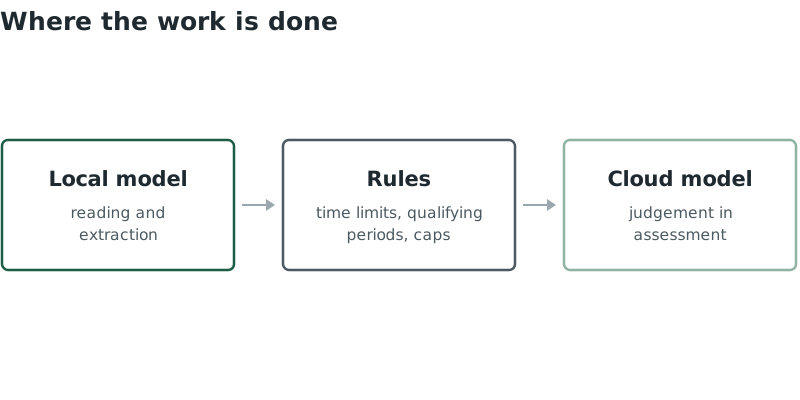
How the work is divided between the local model, rules and a cloud model.
That last part has one advantage that may come as a surprise. Cloud models know the law as it stood when they were trained, and employment law in 2026 has been changing quickly. In testing, the cloud models sometimes applied time limits that had since changed. The rules in the tool are kept up to date separately, so they catch that kind of error, whichever model is used.
So far the assessment tool has only been used on invented scenarios. Before it could be used on a real client’s information, it would need the safeguards that sending confidential material to a cloud service calls for: removing names and identifying details first, making clear to the user what is being sent, and checking the provider’s terms. That is part of what any law centre or advice organisation would need to weigh before using it.
The comparison at the end of the series puts the same problems to the major cloud services and to the tools built here, and marks the answers blind. Knowing where each approach is strong should make those results easier to read.